Patterns
A pattern describes a group of phone numbers: an area code, an exchange, one number, a country, or a region of a country.
- Adding a pattern
- US numbers
- Other countries
- Always allow
- Switching patterns on and off
- Patterns that match everyone
- Tips
Adding a pattern
On the Patterns tab:
- Type the pattern, e.g.
602*. - Optionally add a note to remind you why, e.g. Phoenix spam calls.
- Choose Block or Always allow.
- Tap Add.
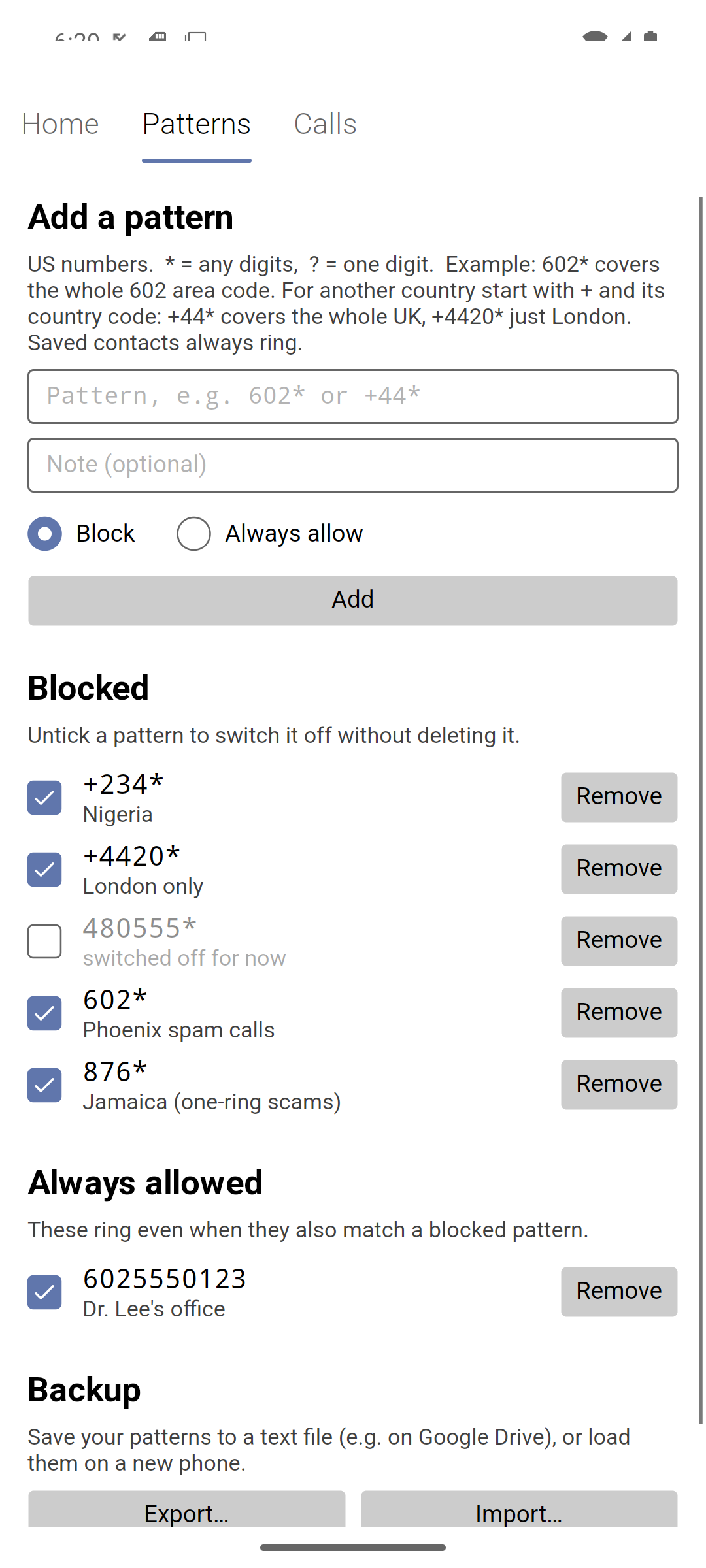
Under each pattern Call Guard shows the place it covers — Arizona for 602*, Jamaica for 876*, United Kingdom for +44* — a quick check that you typed the area or country code you meant. Before relying on a pattern, check it with Test a number on the Home tab.
US numbers
US numbers (and others in the +1 zone, such as Canada) are matched as their 10 digits — area code, exchange, line — without the leading 1.
| Pattern | Matches |
|---|---|
602* | every number in area code 602 |
602555* | every number starting 602-555 |
602555???? | the same, written with single-digit wildcards |
602???1234 | 602-any-1234 |
6025550123 | exactly (602) 555-0123 |
*stands for any number of digits (including none).?stands for exactly one digit.- A pattern without
*has to match the whole number:602555matches nothing, because no phone number is only 6 digits long. - Spaces, dashes, dots and brackets are ignored, and so is a leading
+1or1.+1 (602) 555-****,1-602-555-****and602555****are the same pattern.
Other countries
Start the pattern with + and the country’s calling code:
| Pattern | Matches |
|---|---|
+44* | every number in the UK |
+4420* | London only (UK area code 20) |
+447* | UK mobile numbers |
+234* | every number in Nigeria |
+91* | every number in India |
011 44* | the same as +44* — 011 is how you dial abroad from the US |
After the country code, patterns work exactly like US ones: add the region’s code for one region of a country (+4420*), or a complete number to match just that number.
Patterns that start with + only ever match calls from other countries, and patterns without it only match US-zone numbers. So +44* (the UK) and 440* (an Ohio area code) can never catch each other’s calls, even though both start with 44.
Canada and the Caribbean
Canada and many Caribbean islands share the US country code, +1, so their numbers look like US numbers. Block them with area-code patterns, not + patterns. Some area codes are known for “one-ring” scam calls that try to make you call back at high international rates:
| Pattern | Where |
|---|---|
876* | Jamaica |
809*, 829*, 849* | Dominican Republic |
284* | British Virgin Islands |
473* | Grenada |
649* | Turks and Caicos |
268* | Antigua and Barbuda |
664* | Montserrat |
767* | Dominica |
Always allow
Always allow patterns ring even when the number also matches a blocked pattern. Use them for the exceptions — for example 602* blocked but 6025550123 (your doctor’s office) always allowed.
You don’t need always-allow patterns for people in your contacts: they always ring anyway.
Switching patterns on and off
Each pattern has a check box. Untick it to switch the pattern off without deleting it — it stays in the list, greyed out, ready to switch back on. Only ticked patterns count.
To pause blocking altogether, untick all your blocked patterns. The Home tab then warns that every call will ring.
Remove deletes a pattern for good.
Patterns that match everyone
A pattern with no digits, such as * or ??????????, would block every caller who isn’t in your contacts. In case that’s a mistake, Call Guard shows a warning and only adds it when you tap Add a second time.
Tips
- Start broad, then add exceptions. Block the area code, then always-allow the few numbers from it you want — or simply save them as contacts.
- Use notes. “Phoenix spam calls” is easier to understand next month than
602*. - Block a caller from the Calls tab. A number that got through can be blocked with one tap on its Block button (and a wrongly blocked one allowed with Allow).
- Keep a backup. Export… on the Patterns tab saves all your patterns to a file. See Backup.