Using the app
Call Guard has three tabs: Home, Patterns and Calls.
Home
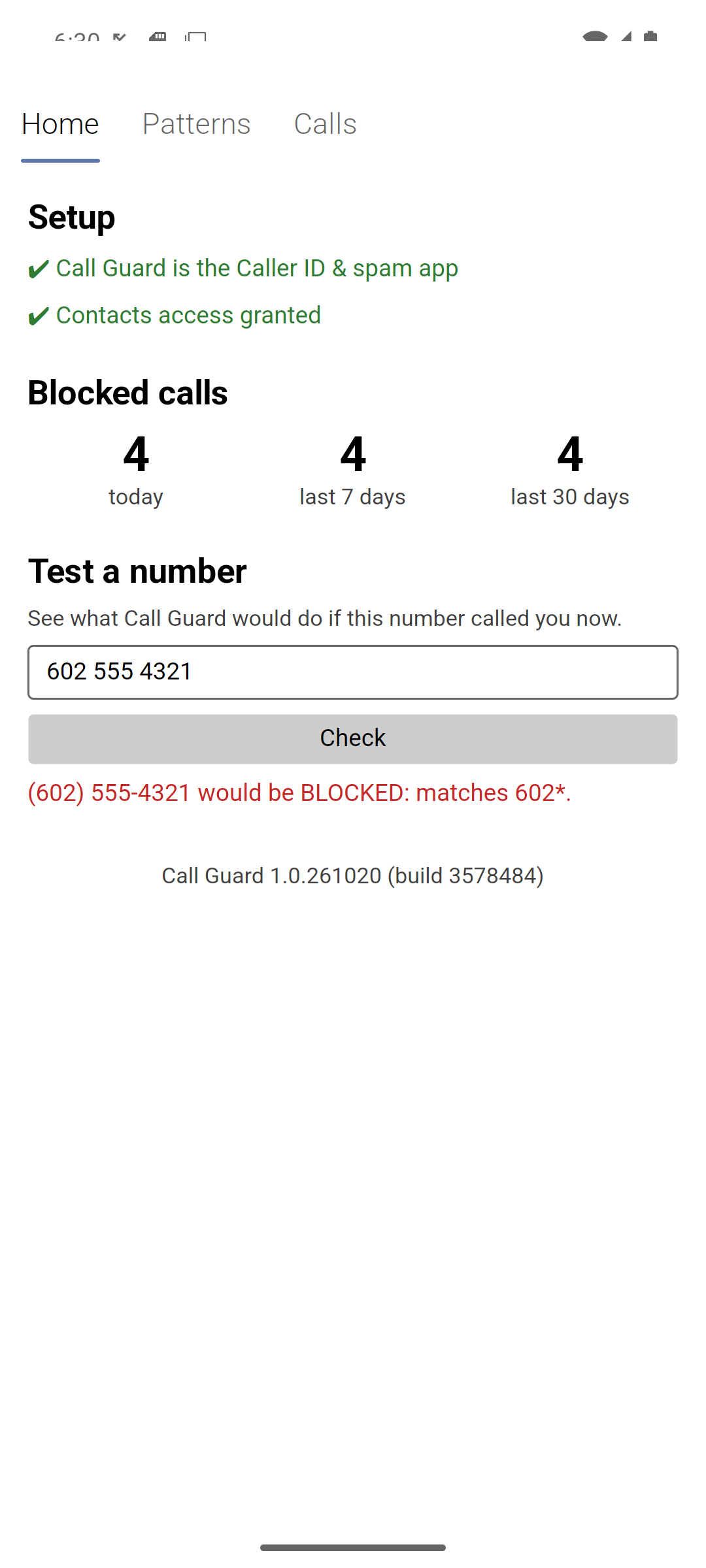
Setup
Shows whether Call Guard is the Caller ID & spam app and has contacts access, each with a button to fix it (Setup). A red line also warns when no blocked pattern is switched on — then every call rings.
Blocked calls
How many calls Call Guard blocked today, in the last 7 days and in the last 30 days. The counts update as calls come in.
Calls blocked by the Phone app (for example private numbers, if you block Unknown there) aren’t counted: Call Guard never sees them.
Test a number
Type any phone number and tap Check to see what Call Guard would do if that number called you right now, and why. For example:
- (602) 555-4321 (Arizona) would be BLOCKED: matches 602*.
- (602) 555-0001 (Arizona) would ring: contact in Google (matches 602*).
- (602) 555-0123 (Arizona) would ring: always allow 6025550123.
- (416) 555-1234 (Ontario, Canada) would ring: no pattern matches it.
It uses your real patterns and contacts, so it’s the quickest way to check a new pattern. For another country, type the number with its + and country code, e.g. +44 20 7123 4567.
Version
The bottom of the Home tab shows the installed version and build, e.g. Call Guard 1.0.261020 (build 3578484).
Patterns
Add, switch on and off, and remove the patterns that decide which calls are blocked. The tab has three parts:
- Add a pattern — the pattern, an optional note, and Block or Always allow.
- Blocked and Always allowed — your patterns, each with an on/off check box and a Remove button. Under each pattern is the place it covers, e.g. Arizona for
602*or London, United Kingdom for+4420*. Nothing is shown when the pattern has too few digits to tell, such as60*. - Backup — export and import.
See Patterns for how to write them.
Backup
- Export… saves all your patterns to a text file. Choose where — the phone’s Downloads, or Google Drive so the file survives losing the phone.
- Import… reads such a file and adds its patterns. Patterns you already have are skipped, and lines that aren’t valid patterns are counted and skipped.
The file is plain text, one pattern per line, so you can also write or edit it by hand:
# Call Guard patterns
block 602*          # Phoenix spam calls
block +44*          # every UK number
block 480* (off)    # kept, but switched off
allow 6025550123    # Dr. Lee's office
480555*             # no keyword means block
blockorallow, then the pattern. No keyword meansblock.(off)after the pattern imports it switched off.- Anything after
#is the note. Lines starting with#are ignored.
Calls
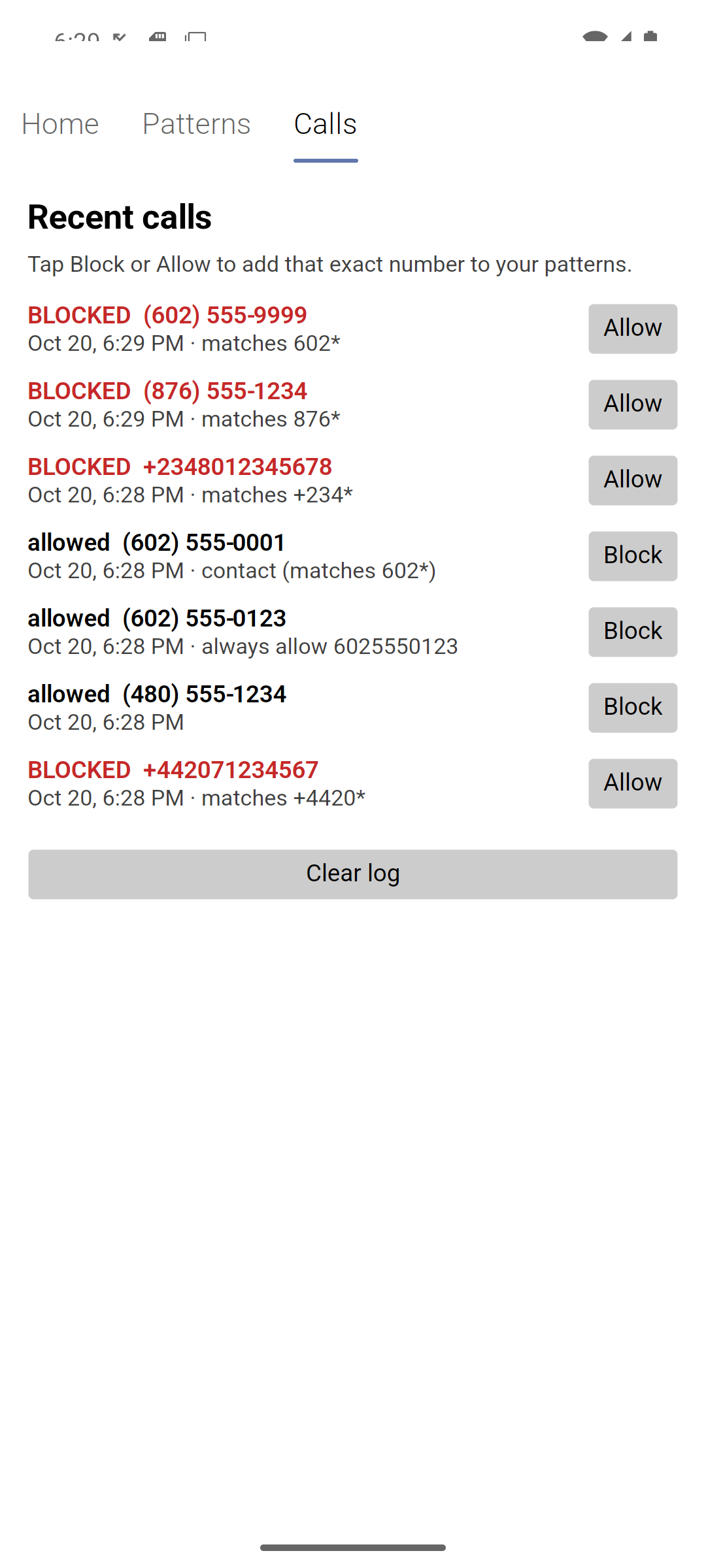
Every call Call Guard screened, newest first, with when it came in, where the number is from (e.g. Arizona or Ontario, Canada), what Call Guard did and why:
| Shown as | Meaning |
|---|---|
BLOCKED (red) · matches 602* | Rejected because it matched that pattern. |
allowed · contact in Google (matches 602*) | Matched a pattern, but the caller is a saved contact, so it rang. It names where the copy holding that number comes from: Google, WhatsApp, Signal, SIM card, this phone (saved on the phone only), … |
allowed · always allow 6025550123 | Matched an always-allow pattern. |
| allowed (no reason) | No pattern matched. |
| allowed hidden number | No caller ID; left to the Phone app. |
allowed · ERROR … (call allowed) | Something went wrong while deciding, so the call rang (see How it works). |
Each row has a button:
- Block on a call that rang adds that exact number as a blocked pattern.
- Allow on a blocked call adds that exact number as an always-allow pattern.
Clear log empties the list. Call Guard keeps the newest 500 calls.